

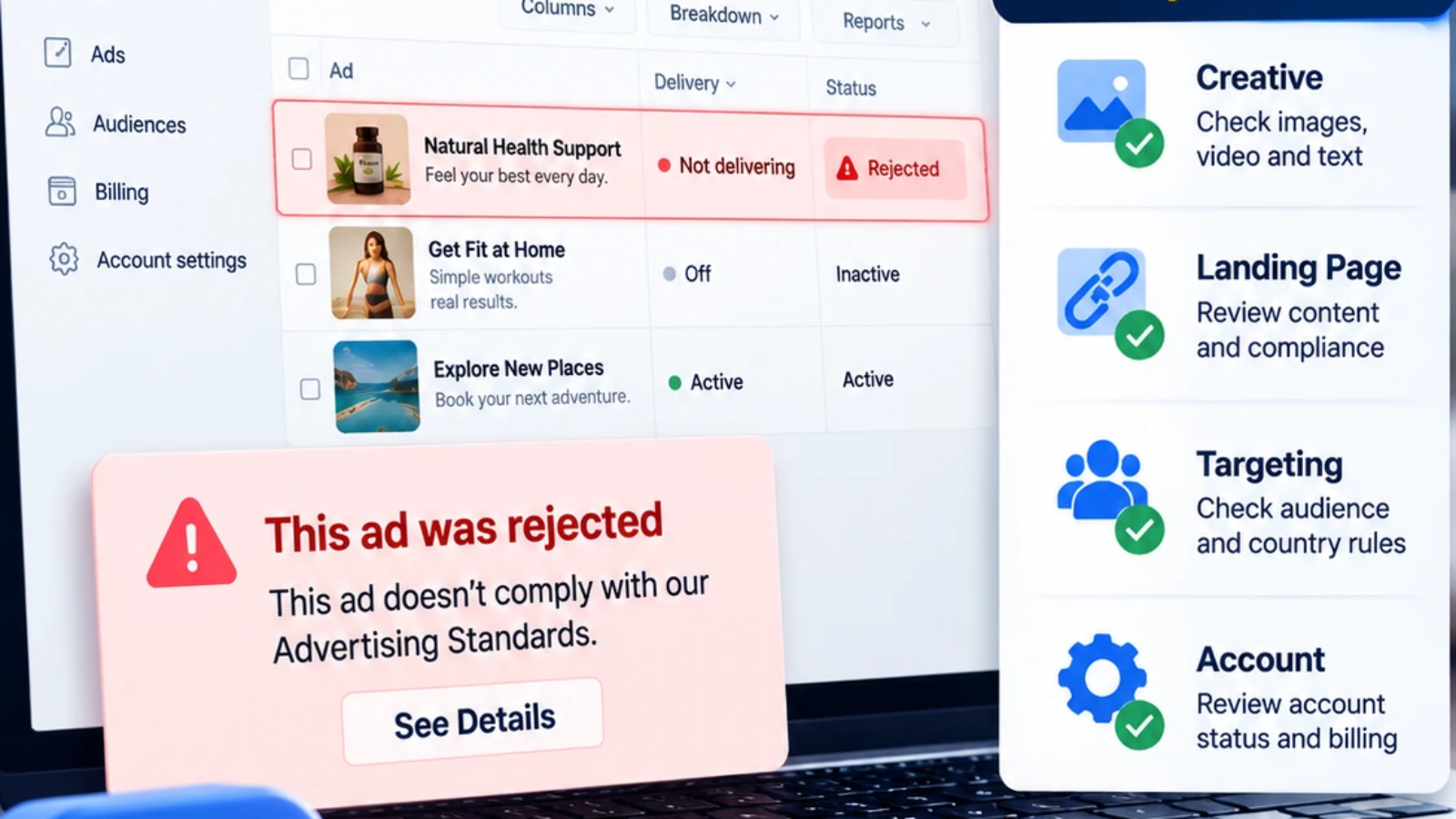
Facebook Ads Rejected? Common Reasons and Fixes
Black Ads Agency can help you understand why your Facebook ads are getting rejected, how you can fix the problem and create a tighter and more clear advertising funnel, so you don’t waste any additional funds. Our Facebook ads approval service helps businesses review and improve campaigns before resubmission.
When you receive a Facebook ad rejection, it might be confusing because Facebook doesn’t always give you a specific reason. In many instances, the problem is more than the image or headline. This could be a claim in the ad, a landing page after clicking on the ad, the audience settings, the product category or signals linked to the ad account.
This guide will analyze the most frequent causes for Facebook ads having been denied, how to properly review a denied campaign, and what to alter in order to make the ad worthy of another review. For broader campaign support, explore Black Ads Agency’s advertising support services.
What a Facebook Ad Rejection Means
When a Facebook ad” is rejected, Meta is aware that a conflict might exist between your campaign and its advertising standards. It could be a creative, text, destination page, offer, targeting, billing, business verification, or account history problem.
Merely a rejection doesn’t indicate that your company is dishonest or that your account will be ruined. In many cases, only one particular component requires correction. However, it is important that if you keep being rejected that it is taken seriously as it can raise the risk associated with the account.
Meta may review:
- Images, videos, thumbnails and overlays of text.If you need help preparing these elements before launch, see our Facebook Ads approval service.
- Headlines and description of the product or content are included.
- Calls to action.
- Product or service claims.
- Content and features of the landing page.
- Identifying decisions such as age and country.
- Special ad categories.
- account signals and Business verification.
Why Facebook Ads Get Rejected
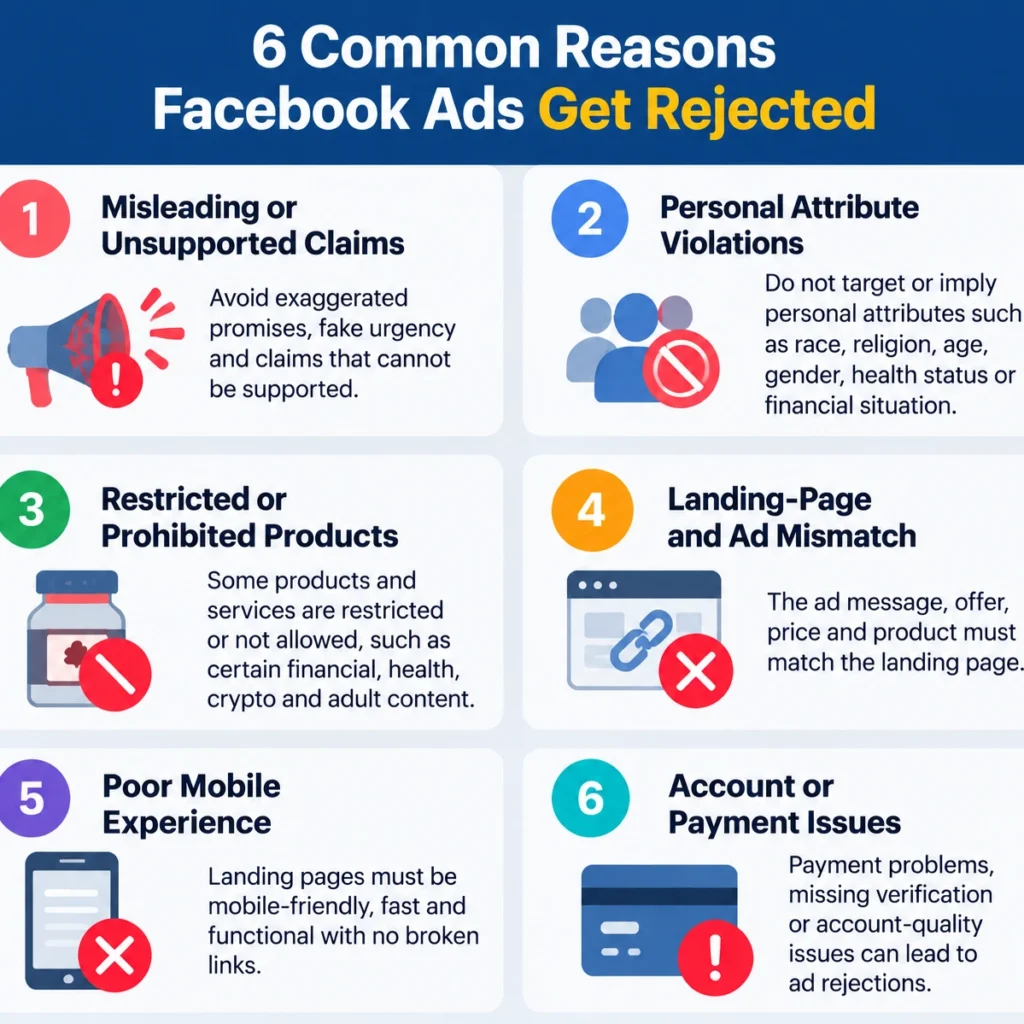
The majority of Facebook ad rejections come in six categories: claims that are misleading, language referencing personal attributes, restricted products, poor landing pages, ad-to-page mismatch, and account and targeting problems.
1. Misleading or Unsupported Claims
Facebook can deny ads which have guarantees that the advertiser does not have reasonable evidence for.
Common examples include:
- Ensuring returns on investment, or income, or guaranteed income.
- Guaranteed weight loss or health benefits.
- The claim that a product has the power to heal a medical disease.
- The results of your search will include “get rich quick” messages.
- Exaggerated sense of urgency, or false scarcity.
- A testimonial is only valid if it is verifiable.
- exaggerated before-and-after promises.
Give a description of what the product/service does and who it’s for rather than promising a result.
For example:
- Instead of: “Make $10,000 in 7 days.”
- Apply: “Develop an online service business step by step.”
Any claim that is part of the ad is required to be supported by the landing page.Black Ads Agency’s campaign-readiness review can help identify unsupported or exaggerated claims before submission.
2. Personal-Attribute Language
Facebook does not allow ads to imply that you know sensitive personal characteristics about those who may view the ads. It encompasses health issues, financial status, religion, ethnicity, disability, sexual orientation, gender identity and more.
Avoid copy such as:
- Are you overweight?
- Have you ever been told that you have diabetes?
- Bad credit?
- This is something that single parents need.
- Christians will be delighted with this deal.
Instead, word your offer in terms of the offer:
- Dive into meal-planning resources for diabetic-friendly recipes.
- Research credit building options and requirements.
- Parenting, practical tools for busy parents.
The difference lies in the description, not making any assumption about the viewer.
3. Restricted or Prohibited Products.
Certain products and services are limited, excluded or require extra documentation. There can also be country, age group and product category specific rules.
Examples include:
- Some financial services and loans are available.
- Cryptocurrency and investment products.
- Health, wellness and supplement products.
- Adult content Tobacco and vaping products.
- Some subscription or lead generation offers.
- Products with regulated claims.
Before launching a new offer, check if the offer is permitted in the targeted country, if there are any age restrictions, and if certain disclosures are required on the landing page. Learn more about restricted advertising categories and campaign eligibility support.
4. Before-and-After or Shocking Imagery
Pre/post photographs, extreme body images, medical graphics and shocking content can pose a policy risk particularly for health, beauty, fitness and weight-loss campaigns.
A more effective strategy is to provide a “realistic” product, service, process or benefit. Our creative and copy review support can help assess whether visuals and claims meet platform expectations. Use clear visuals that represent what the customer will receive – don’t portray exaggeration or sensational images.
5. Landing-Page and Ad Mismatch
Meta sees the destination page during the advertising process.Meta sees the destination page part of the advertising process. The campaign could be rejected if the ad says one thing, but the landing page is quite different.
Typical problems that may occur in the mismatch process are:
- The page doesn’t show the discount shown in the ad.
- The landing page is an offer for a product that is different.
- There is a mismatch between the price on the advertised page and the price.
- The ad offers a free trial and includes hidden paid subscription information.
- Users are redirected to another offer which is not related to the page they are on.
- The call to action is not aligned with the next step.
Ensure the product, offer, price, benefit and call to action is consistent throughout the entire conversion funnel from initial click to conversion. Black Ads Agency provides landing-page review and campaign-readiness support for this purpose.
6. Low-Quality or Incomplete Landing Pages
The landing page ought to be operable, straightforward, mobile as well as convenient. Businesses can improve landing-page compliance by fixing technical issues, improving transparency, and aligning the page with the advertised offer. Rejected due to broken pages, slow loading speed, missing information, and bad user experience.
Look at your page for:
- Broken links.
- Slow loading speed.
- Poor mobile layout.
- Missing contact details.
- No privacy policy or terms.
- Unclear business identity.
- Confusing navigation.
- Excessive pop-ups.
- Misleading buttons.
- Non-functional forms or checkout pages
Why the Landing Page Matters So Much
The landing page is not separate from the ad. It is part of the promise you make to the user. A clear, compliant funnel is a core part of Facebook ad approval support.
A strong Facebook landing page should clearly show:
| Landing-Page Element | What to Include |
|---|---|
| Business Identity | Brand name, About information, and clear branding |
| Contact Information | Email, phone number, address, or support method |
| Legal Pages | Privacy policy, terms, refund, return, and shipping details where relevant |
| Offer Clarity | Product, price, benefits, and next step |
| Ad Consistency | The same product, offer, and message as the ad |
| Mobile Experience | Responsive design, readable text, and working forms |
| Technical Quality | HTTPS, working links, and acceptable loading speed |
| User Experience | No misleading buttons, forced redirects, or disruptive pop-ups |
| Claims & Disclosures | Accurate claims, disclaimers, and supporting information |
How Facebook Reviews Ads?
Facebook’s automated systems and in some instances user reviews determine whether an ad conforms to Facebook’s advertising standards. For a Facebook-specific overview, see our Facebook ads cloaking page. The review could contain the following information: ad creative, text, destination page, targeting, special ad category or advertiser account details.
Rejection doesn’t necessarily mean that someone is doing something wrong. This may be due to inadequate information on the landing page, a technical problem, limited product category, targeting, or a statement that requires more context.
Therefore, it’s often not enough to simply rerun the same ad; it needs to be changed.
Common Facebook Rejection Messages:
Meta’s rejection messages are often broad, but they can point you toward the right area to review.
| Rejection Message | Likely Area to Review |
|---|---|
| Personal Attributes | Ad copy that assumes sensitive traits about the viewer |
| Misleading or False Claims | Exaggerated results, unsupported promises, or inaccurate offers |
| Restricted Content | Product category, country eligibility, age restrictions, or claims |
| Destination Not Working | Broken links, slow pages, poor mobile experience, or unavailable pages |
| Low-Quality or Disruptive Content | Pop-ups, weak design, misleading buttons, or poor user experience |
| Circumventing Systems | Attempts to interfere with platform review or enforcement |
| Unacceptable Business Practices | Unclear business identity, misleading offers, or poor transparency |
Cloaking Ads and Facebook Ad Rejections?
Ads are either blurred or completely hidden.Ads are hidden or blurred. In ad-related terms, cloaking ads and ads cloaking are frequently used to refer to systems designed for traffic routing and/or content delivery. When they are employed to present a “safe” page to an ad reviewer and direct the real users to a different page, it can be a violation of Meta’s policies.
Facebook wants the person who clicks an ad to see a destination that is similar to the offer they’ve been advertised. An offer that isn’t reviewed could result in rejected ads, limited delivery, disabled ad accounts, and lost trust.
Black Ads Agency considers cloaking ads as risk factor, rather than a recommended growth strategy. Read more about our Facebook ads cloaking approach and compliance-focused campaign support. Where a business is utilizing various landing pages for language, device, or location reasons, each landing page should be honest, relevant, policy-compliant, and clearly linked to the advertised offer.
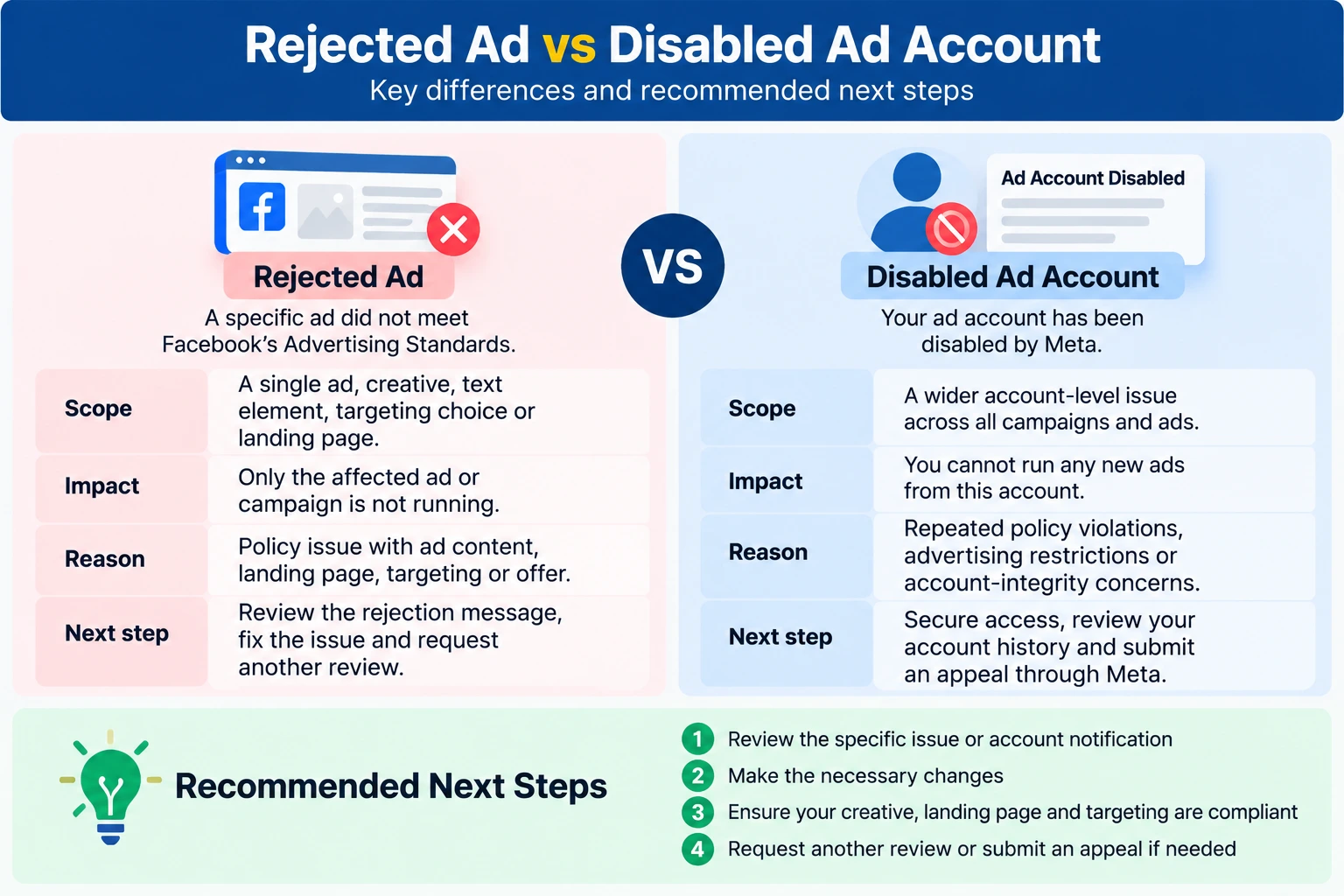
Ad Rejection vs Account Restriction
A rejected ad and a restricted ad account are not the same problem.
| Rejection Message | Likely Area to Review |
|---|---|
| Personal Attributes | Ad copy that assumes sensitive traits about the viewer |
| Misleading or False Claims | Exaggerated results, unsupported promises, or inaccurate offers |
| Restricted Content | Product category, country eligibility, age restrictions, or claims |
| Destination Not Working | Broken links, slow pages, poor mobile experience, or unavailable pages |
| Low-Quality or Disruptive Content | Pop-ups, weak design, misleading buttons, or poor user experience |
| Circumventing Systems | Attempts to interfere with platform review or enforcement |
| Unacceptable Business Practices | Unclear business identity, misleading offers, or poor transparency |
How to Review a Rejected Facebook Ad?
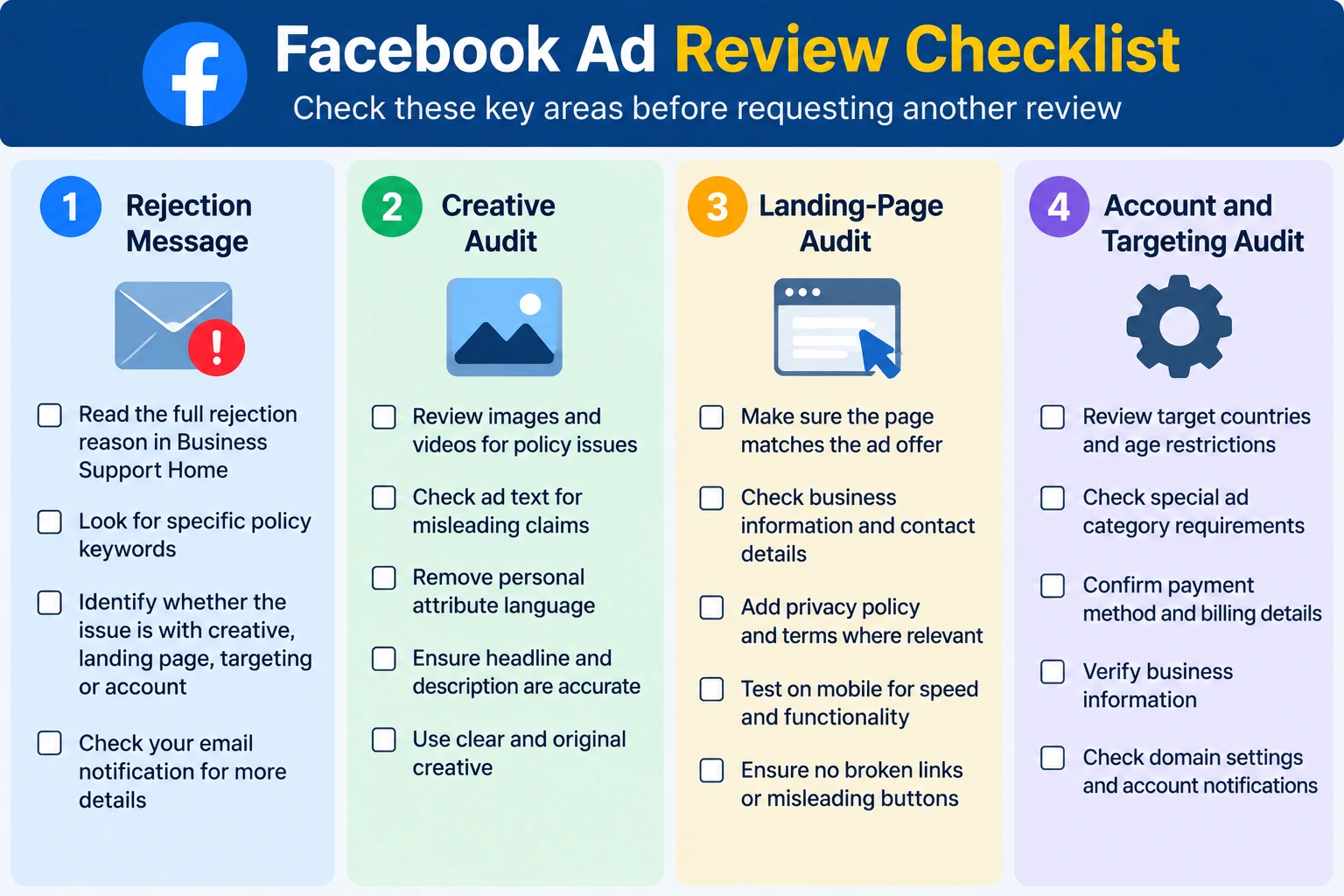
Avoid submitting the same ad right away. The first step in finding a solution is to determine what is most likely to be the cause.
Step 1: Read the rejection message:
Look for the notification in Ads Manager, Business Support Home or in your email account.
For the following phrases, look for:
- Personal attributes.
- Deceptive or incorrect statements.
- Restricted content.
- Destination not working.
- Content of poor quality or content that is disruptive.
- Circumventing systems.
- Unacceptable business practices.
Even a general message will help you determine whether you want to go back to the Creative, Landing page, Targeting or Account. A structured campaign-readiness review can help prioritize the most likely issue.
Step 2: Audit the ad creative:
Review every visible part of the ad. Black Ads Agency’s creative review and copy review can help identify risky claims, visuals, and messaging:| Creative Element | What to Check |
|---|---|
| Image or Video | Shocking imagery, misleading visuals, exaggerated demonstrations, poor quality |
| Primary Text | Unrealistic promises, personal-attribute language, restricted claims |
| Headline | Accuracy, clarity, and consistency with the landing page |
| Description | Missing disclosures or misleading details |
| Call to Action | Whether it matches the landing-page experience |
| Offer | Whether the promoted offer is clear and accurate |
Step 3: Audit the landing page
View the landing page as a new customer would. Check on a computer and on a mobile device. Our landing-page transparency review focuses on offer clarity, business identity, legal pages, and mobile usability.
Check:
- Information about the business name and About section
- Contact details
- Privacy policy and terms
- Refund and/or return and/or shipping and/or fulfilment information
- Product details and pricing
- Include a consistency with the ad
- Mobile usability
- Page speed
- Working links and forms
- HTTPS security
- Pop-ups and redirects
Step 4: Review targeting and account settings:
Review:
- Target countries and regions.
- Age range Language settings.
- Special ad categories.
- Billing status.
- Business verification.
- Admin access.
- Connected domains.
- Account notifications.
- Previous policy warnings.
The problem may stem from the account or the domain or the payment method or the targeting setup, but the ad creative itself is OK. Black Ads Agency can assist with business and domain readiness review.
How to Fix a Rejected Facebook Ad?
Correct the most likely issue:
On the basis of your review, you should modify the element that is most likely the cause of the rejection. For prioritized next steps, explore advertising support services.
Examples include:
- Softening exaggerated claims.
- Removing personal-attribute language.
- Replacing before-and-after imagery.
- Fixing broken links.
- Improving mobile usability.
- To add missing legal pages to the document.
- Providing a landing page matching the ad.
- Modifying targeting for country and/or age restrictions.
Request another review:
If you feel that the ad was rejected incorrectly, you can request a review again in Meta Business Support Home. If you need help interpreting the rejection or preparing a correction, contact Black Ads Agency. First, correct any issues that are obvious and then provide a clear and concise explanation that is factual and based on the relevant policy.
Avoid repeated resubmissions:
Avoid submitting the same version more than once without significant changes made. This can be time consuming and can also raise the risk for the accounts.
- Determine what is likely to be the cause of the problem.
- Correction that is clear and one.
- Test an updated version.
- Write out the response message and the change that is made.
How to Appeal a Facebook Ad Rejection?
Follow this process:
- Start Meta Business Support Home page.
- Locate the rejected ad.
- Check the reason for rejection.
- Fix the creative problem, landing page problem, targeting problem, or account problem.
- Ask to be reviewed again via the official Ads Manager system.
- Provide a clear, accurate explanation of the correction. If you need professional help reviewing the rejection reason, contact Black Ads Agency.
- Do not make several appeals that are contradictory.
Do not make additional edits to the appeal during the appeal review if not advised to do so by Meta.
How to Prevent Future Facebook Ad Rejections?
Before you start a campaign review this checklist. For help preparing campaigns before launch, see Facebook advertising support:
- Check the ads for any exaggerated or unsubstantiated claims.
- Remove personal-attribute language.
- Ensure products are eligible in all target countries.
- Test landing page on mobile.
- Verify that the ad matches the ad landing page.
- Incorporate clear business and contact information.
- Read through the privacy, terms, refund and shipping pages.
- Test forms, buttons and links.
- Check targeting, age and country settings.
- Keep an eye on account alerts and notifications.
- Use original creative that is representative of the actual offer.
When to Get Professional Support?
There are situations that can be addressed within a business if it has a rejection issue. Others require a formal review, particularly if they are in a regulated industry, have multiple countries or if they are facing rejections.
Professional assistance can be found for:
- Campaign-readiness review.
- Black Ads Agency provides campaign-readiness, creative, landing-page, domain, and rejection-message reviews.
- Creative review and copy review.
- Landing-page transparency review
- Current Business and Domain readiness review.
- The goal of the target country is to review each country’s eligibility for the program.
- Rejection-message analysis
- Prioritized next steps
If you’re having your ads rejected by advertisers, request a campaign consultation with Black Ads Agency. We can help you review them and create clear, cohesive advertising assets. Approval, delivery, account reinstatement, and results of performance are guaranteed; Meta determines the approval.
Why does Facebook reject ads without a clear reason?
If there is a potential policy issue, Meta may issue a general rejection message. Look through creative, landing page and targeting and account notifications and product claims to find the most likely cause.
Can I appeal a rejected Facebook ad?
Yes. If you think that the ad was rejected incorrectly, you can review it again via Meta Business Support Home. Try to handle the probable problem first, then explain briefly and factually.
Why was my Facebook ad rejected because of the landing page?
The landing page can lack content or be slow, broken, misleading, or inconsistent with the ad or be not mobile friendly. Check out business identity, contact information, legal pages, claims, and user experience.
Does a rejected Facebook ad mean my account will be disabled?
Not always. If an ad is rejected, it’s most likely associated with a particular campaign asset or setting. If you see recurring policy issues, however, repair the likely root cause before resubmitting your accounts, as it means that risks on your accounts are rising.
How long does Facebook ad review take?
Review times vary. Some ads are examined fast, and others might take longer based on campaign, product classification, destination URL, and account context.
What should I do if my Facebook ad keeps getting rejected?
Please do not resubmit the same version. Check the rejection letter, audit and look at the creative, look at the landing page, look at how you have targeted and set up your account, make one meaningful change and test a new version.
Final Takeaway
The most common reasons for Facebook ads getting rejected are unsupported claims, personal-attribute language, restricted products, weak landing pages, ad-to-page mismatch, targeting restrictions or account-quality signals.
It is best not to cover it up. It is to take a look at the entire user journey, fix the weakest link and build a clear campaign that depicts the offer.
Black Ads Agency offers businesses the ability to develop policy-driven campaigns, audit all your advertising assets including landing pages, and reduce all unnecessary risks when it comes to your advertising before you can start scaling.